Five screens, from a broker login
to knowing what to change.
Every step below is a real screen in the shipping product, captured from the running app. Nothing here describes a feature that does not exist.
Step 1
Connect your broker, or import a file
Link a brokerage account read-only through SnapTrade and Trade Planner pulls your real fills — 30+ brokers supported. No API keys to paste, no orders ever placed on your behalf. Prefer files? Import a CSV or a Thinkorswim statement instead.
- Read-only connection — Trade Planner can never place or modify an order
- 30+ brokers via SnapTrade, plus CSV and Thinkorswim import
- Historical fills backfilled, not just trades from today onward
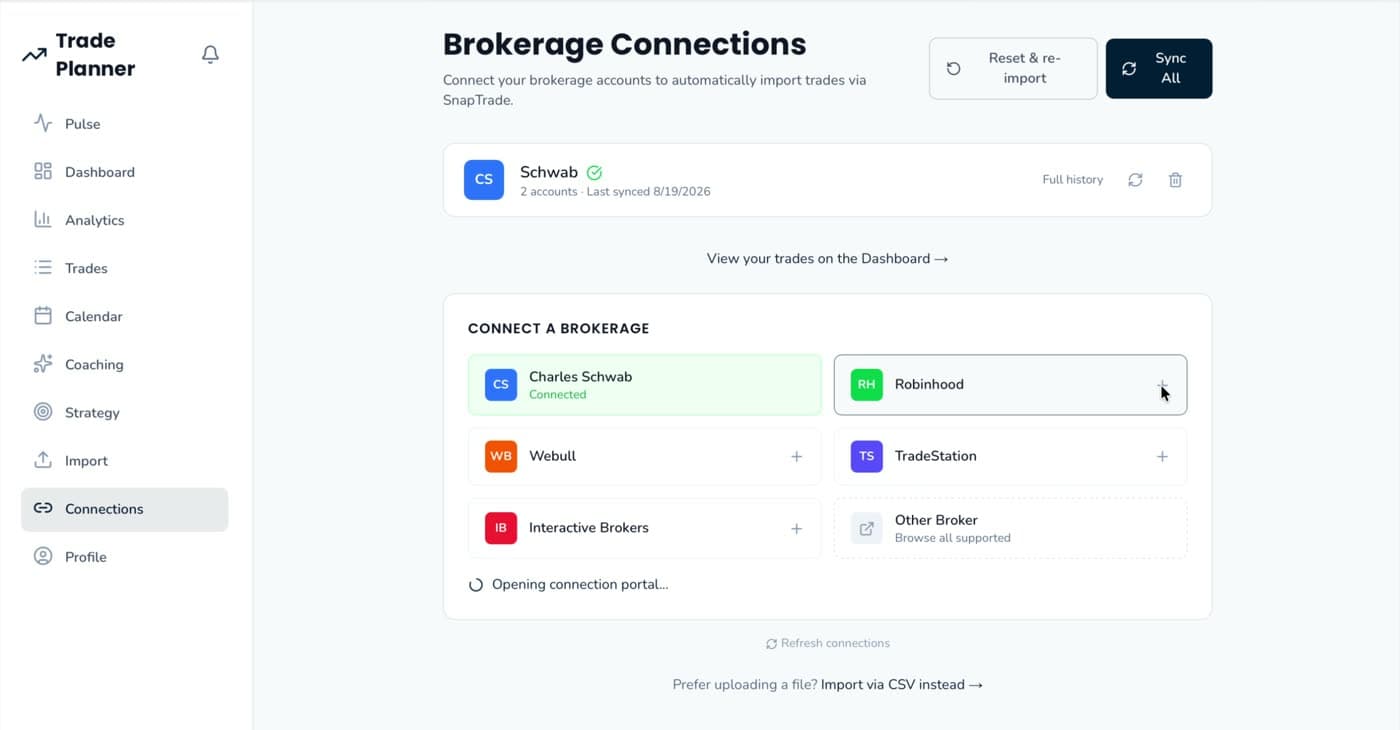
On this screen
- Thinkorswim, Webull, IBKR and Schwab CSV formats detected automatically
- Re-syncs deduplicate — no double-counted fills
- Multiple accounts stay separate; realized matching never crosses them
- Broker holdings come in too, with real cost basis and live marks
- New activity is pulled on arrival, without a button
Everything that ships today
The complete feature list,
with nothing on it that isn’t built.
Ingestion
- Read-only broker sync via SnapTrade — 30+ institutions
- CSV import: Thinkorswim, Webull, IBKR, Schwab
- Automatic format detection
- Historical backfill and dedupe on re-sync
- Manual trade entry, edit and delete
- Per-account scoping
- Broker holdings with cost basis and live marks
Per-trade context
- Daily bar, VWAP, RSI, MACD, SMA and EMA at the fill
- Options greeks, implied volatility, break-even, open interest
- News headlines with sentiment and the reasoning behind it
- Entry signals: gap, prior-day breaks, 20-day range position, trend, momentum
- Annotated chart of the trade
- Symbol win rate in context
Classification
- 36 canonical setups plus custom write-ins
- Seven market regimes, seven session windows
- Risk profile and outcome quality per trade
- Confidence scores and a low-confidence review queue
- One-click override that carries forward
Truth & reporting
- Realized P&L from closing legs only, options expirations included
- Reconciles to the broker statement
- Options rolled up by underlying
- Daily realized-P&L calendar heatmap
- Twelve analytics breakdowns
- PDF trade report over any date range
Behaviour & coaching
- Nine leak detectors measured against your own baseline
- Severity-ranked findings with their evidence
- In-app tilt, insight and import notifications
- AI coach grounded in your verified facts
- Skill assessment and strategy recommendations
- Versioned playbook with rule-follower grading
On the roadmap, not shipped
- Deeper off-chart enrichment — options gamma exposure and flow, volatility regime, sector moves
- Trader-style assessment: scalper, momentum, swing, mean-reversion, position
- Learning centre with spaced-repetition entry and exit drills
- Narrated AI post-mortems of a trade or a week
- Simulations, cross-user benchmarking and community
Listed so you know what you are not buying yet.
Read-only, always
The connection can pull activity and holdings. It cannot place, modify or route an order — there is no code path that does.
No broker? No problem
Thinkorswim, Webull, IBKR and Schwab CSV exports import as first-class data, deduped on re-import.
Your figures stay yours
Account values are masked in session recordings, and nothing is shared or benchmarked against other users.
Or see pricing first.